
Stop Writing Throwaway Serial Test Utilities.
nCom gives engineers and technicians an instant serial test environment for USB serial adapters, RS232, RS485, virtual COM ports, microcontrollers, PLCs, and embedded devices.
nCom Interface
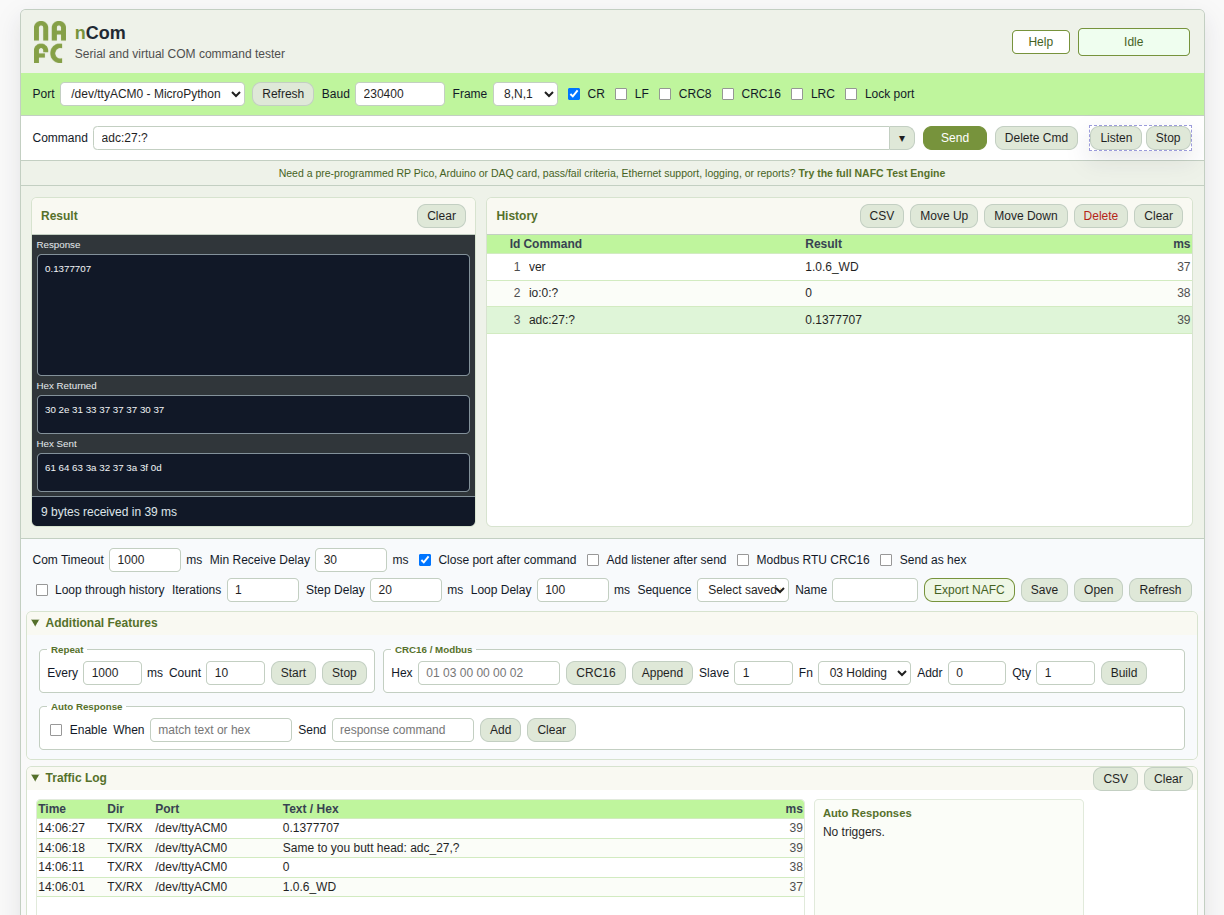
Click image for full resolution.
Command execution, response inspection, command history, saved sequences, response timing, and export functionality in a single portable application.
Send commands, inspect text and hex responses, build reusable sequences, loop tests, save scripts, and troubleshoot devices in minutes instead of building a custom application.
It runs locally on Windows and Linux, requires no installer, and does not need special application permissions. Download the executable, place it in a writable folder, start it, choose a COM port, and begin testing.
Send text or hex commands with baud, frame, CR/LF, CRC8, LRC, and timeout settings.
Copy response text, hex returned, or hex sent from separate result boxes.
Edit history rows, save scripts, open scripts, loop through history, and keep previous results.
Export nCom sequences into NAFC Test Engine when you need pass/fail logic and reports.
Download nCom
Windows
Download the Windows package, extract it, and run the executable from a writable folder.
Download for WindowsLinux
Download the Linux package, extract it, make it executable if needed, and run it locally.
Download for LinuxLicense or Quote
Request a commercial license, workstation quote, support option, or custom integration.
Request QuoteSupport or Purchase
Use this slot for the Stripe donation, license, or order page when it is ready.
Stripe Link Coming SoonRuntime files are stored locally beside the executable. Keep nCom in a writable folder so it can save config, command history, scripts, and exports.
What nCom Can Do
COM setup
Select port, baud rate, frame settings, CR/LF terminators, checksum options, and receive timing.
Text and hex
Send normal commands or hex payloads, then inspect response text, hex returned, and hex sent.
Editable history
Edit rows directly, press Enter to run a row, double click to rerun, move rows, and delete mistakes.
Saved sequences
Save meaningful routines as JSON and reopen them later with commands, timing, settings, results, and ms values.
Variable swaps
Use references such as <3> to insert the result from an earlier row into a later
command.
Script helpers
Use supported NAFC-style script helpers for math, replace, substring, delay, jump, call, return, and conditional flow.
Why Engineers Choose nCom
- No installation and no elevated admin rights required.
- Portable executable for Windows and Linux.
- Text and hex commands with CRC8 and LRC support.
- Command history, reusable sequences, and variable substitution.
- Script export path into NAFC Test Engine.
Focused by Design
nCom is not trying to replace every serial-port suite. It is built for fast command testing, repeatable bench routines, device bring-up, firmware validation, and migration into NAFC Test Engine when the work becomes production test.
Additional Features
Traffic logging
Save sent and received text, hex, timing, and timestamps to a local file for troubleshooting records.
CSV export
Export command history, returned values, response times, and pass-through notes for review or reports.
Timed repeat send
Send a command every configured interval for a fixed count or continuous bench testing session.
CRC16 and Modbus helpers
Add common industrial checksum and Modbus RTU helper workflows without turning the app into a large suite.
Auto-response triggers
Respond automatically when received ASCII or hex data matches a configured sequence.
Multi-port direction
Support broader multi-port workflows while keeping the interface focused on practical command testing.
From nCom to NAFC Test Engine
- Build command sequences in nCom during engineering, service, or troubleshooting work.
- Capture the last returned value and response time for each row.
- Export NAFC-compatible scripts when the routine is ready for a larger test workflow.
- Add pass/fail criteria, operator prompts, Ethernet support, logging, and reporting in NAFC Test Engine.
- Reuse the same command thinking instead of starting over in a custom software project.
- Move from bench testing to controlled production execution when the process is ready.
Pico/Arduino Firmware by NAFC
nCom works with general serial devices. NAFC also offers compatible Pico/Arduino firmware for simple digital IO, analog reads, temperature checks, I2C scans, and fixture support commands.
- Pre-programmed RP Pico or Arduino: current market device cost + $22 programming fee + shipping.
- Firmware files for customer self-loading: $15.
- State the desired device part number in the RFQ to get a firm quote.
ver,id,Temp,DIO,SetIO,adc,I2CScan, andflash.- Command-specific help is available from the device by sending family names such as
io,adc,i2c, orpwm.
License
nCom by NAFC is free for personal, educational, and evaluation use. Commercial use requires a paid license per user or workstation. For licensing, support, or custom integration, contact info@nafctechsolutions.com.
Support, Purchase, or Request a Quote
Support nCom Development
Use this space for the Stripe donation link when it is ready. Suggested minimum: $5.
Donation Link Coming SoonCommercial License
Request license pricing for commercial users, production workstations, or internal teams.
Commercial License RFQCustom Integration
Ask about custom protocol support, scripted routines, firmware work, or NAFC Test Engine migration.
Integration QuoteWhen the Stripe payment pages are created, replace the placeholder donation button with the Stripe link and add any license or firmware order links beside the RFQ buttons.